Troubleshooting
About This Page
This page mainly lists troubles that have been reported.
It gets updated whenever something comes up.
There are of course cases not covered here, so feel free to contact me here.
VideoData shows X mark no matter how many times you reload
There are mainly 4 possible patterns:
-
The ID registered in Server Usage Registration differs from the ID entered in Setup
Please verify that the ID entered in the usage registration form matches the ID entered in Unity. -
YouTube account suspension or restrictions
Is your YouTube account healthy?
If you’re unable to use the YouTube API due to some restrictions, it won’t work. Please prepare another account. -
Google Spreadsheet or Google Apps Script service issues
-
My server down
Try searching for “GAS issues” on Twitter or similar.
If you get hits, it’s the former. It will probably be fixed eventually.
If you don’t get hits, my server might be down or it could be other cases.
Please contact me. Contact information here.
If I’ve disappeared… please set up your own server by following this procedure.
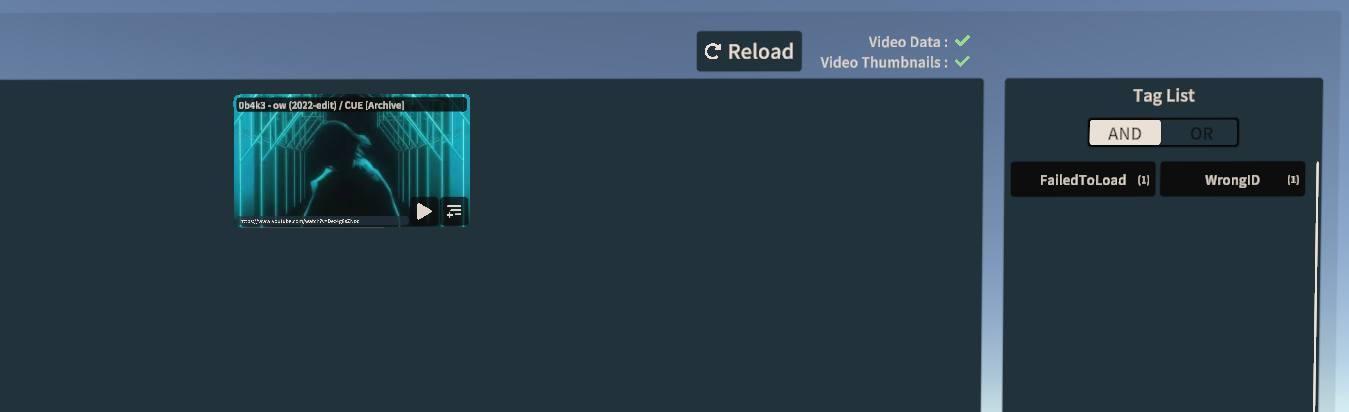
Only one song appears
If you get a screen like the following and pressing the Reload button doesn’t fix it,
the ID registered in Server Usage Registration differs from the ID entered in Setup.
The usage registration form can be edited later, so please check if you entered it correctly.
Cannot play videos (environment dependent)
YamaPlayer allows you to choose between two internal video players: UnityPlayer and AVProVideoPlayer.
The default is UnityPlayer, but some people may not be able to play videos with it.
In that case, switch from YamaPlayer’s settings.
※Songs added to the queue use the player set at the time of addition. If you change the player, rebuild the queue.
Cannot build world
First, open the Console window and press the “Clear” button in the top left.
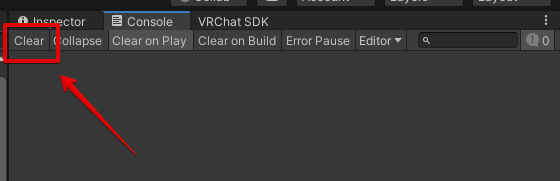
- If red errors remain
There might be an issue with the assets.
Check the WorldSDK version and whether it matches the supported versions, and if there’s no version problem, contact me.
- If no errors remain
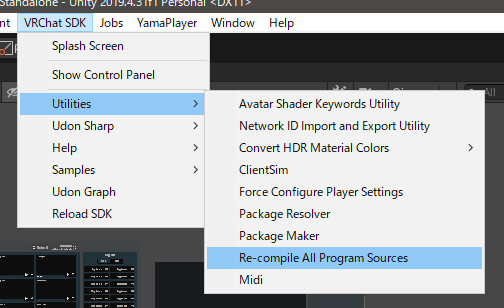
Press “Re-compile All Program Sources” from the following menu.
It takes some time, so wait and try building again.
The “Batch Add to Queue” function disappeared after updating the gimmick…
You don’t need to do all those tedious steps!
The changes made to YamaPlayer remain, so
you only need to do steps 1 and 11.
(Just enable the button and load the Unity Package from the Extra folder)
※If you updated YamaPlayer, you need to do everything.
Redeployed GAS in spreadsheet and changed via Google Form but changes aren’t reflected
Initial registration is done immediately, but
for changes, it takes up to 5 minutes to reflect due to caching.
Please wait a bit and try again.